 Pocket PMO
Project risk matrix software that turns scores into action
Score every risk by probability and impact on a 5x5 grid, then connect the top of the matrix to mitigation plans, open issues, and schedule forecasts.
What is a risk matrix?
A risk matrix is a grid that plots every identified project risk against two questions: how likely is it to happen, and how much damage does it do if it does? Probability runs along one axis, impact along the other. Where a risk lands on the grid tells you how urgently it deserves attention — and, just as importantly, which risks you can safely stop talking about.
The value of the matrix is not the colors. It is the ordering. When every risk is written down and scored the same way, the debate in your risk review stops being "what should we worry about?" and starts being "what are we doing about the top three?" That shift — from an unstructured worry list to a ranked, comparable view of exposure — is why the risk matrix has survived every project management fashion since it appeared.
A risk matrix is also the qualitative half of risk management. It captures judgment: which threats the team believes are real, and how bad they would be. The quantitative half — schedule simulation, estimate ranges, confidence levels — builds on top of that same judgment. Teams that skip the matrix usually end up feeding gut feel into their forecasts without ever writing the gut feel down.
Why most risk matrices go stale
Most risk matrices are built once, at kickoff, and never seriously touched again. Scores were opinions on day one; by month three they are fiction. The register becomes risk wallpaper — present in every steering pack, influencing no decision. The failure is not the tool, it is the disconnection: the matrix lives in a spreadsheet while the actual work lives somewhere else, so nothing that happens during delivery ever flows back into the scores. A risk matrix earns its keep only when scores move, and movement triggers decisions. That is the standard Pocket PMO is built against.
How the Pocket PMO risk matrix works
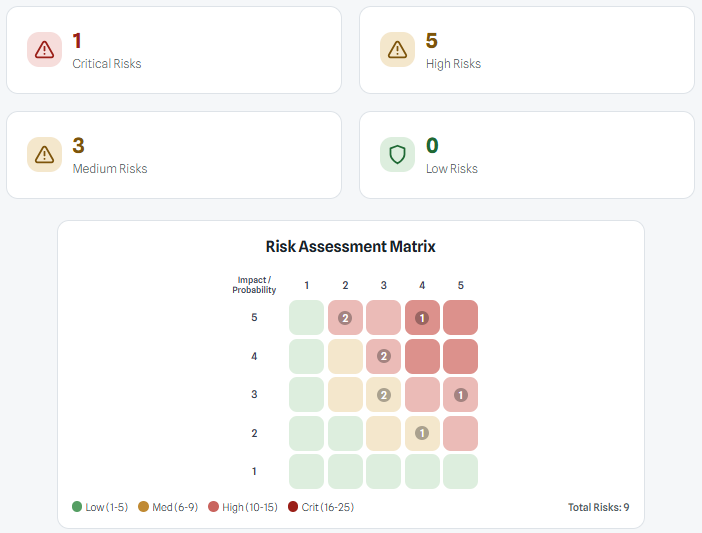
Pocket PMO uses a 5x5 matrix. You score every risk on two scales, each from 1 to 5: probability of occurrence and impact on the project. The matrix multiplies them into a single exposure score and places the risk in a color-coded cell, so the shape of your risk profile is visible before anyone reads a word.
The scoring bands are fixed, so two people scoring the same risk cannot land in different tiers:
- Score 16-25 — Critical: act now, escalate, and consider contingency
- Score 10-15 — High: active mitigation with a named plan and review date
- Score 6-9 — Medium: monitor closely and review at each checkpoint
- Score 1-5 — Low: accept and revisit if conditions change
The register behind the grid
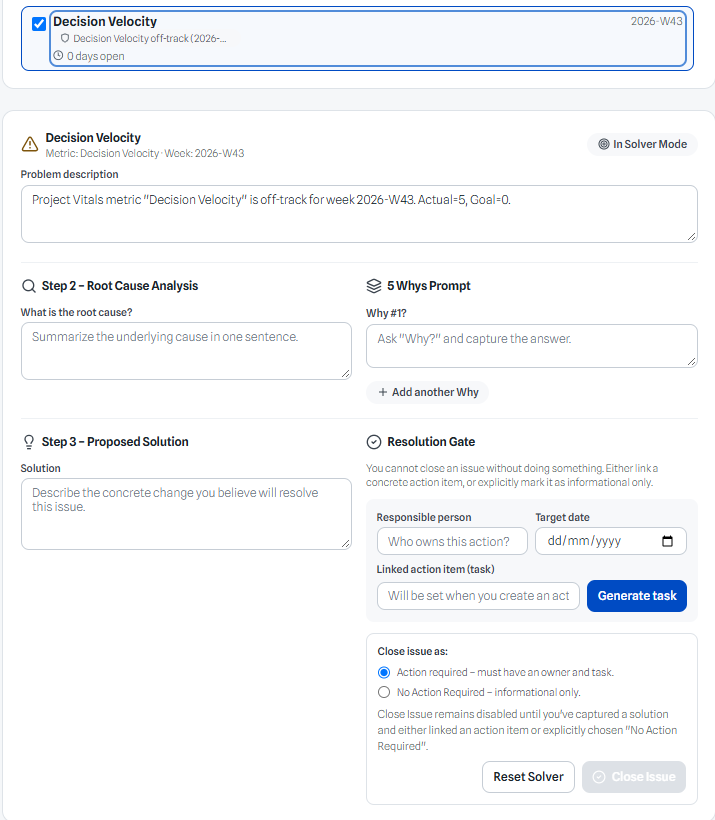
A cell on a grid is not enough to act on, so every risk in Pocket PMO carries a full record: a clear name, a description of the threat, a category, the probability and impact scores, the computed severity level, a mitigation plan, and a next review date.
The register and the matrix are the same data seen two ways. The grid answers "what matters most?" The register answers "what exactly are we doing about it?" Filter the register by severity level or category to run a focused review — critical risks first, or everything in the supplier category — and export the filtered view as a CSV when a steering committee or auditor wants the risk position in writing.
The next review date is the anti-staleness mechanism. Instead of promising to "look at the register regularly," each risk carries its own revisit-by date, so review cadence is a property of the risk, not a memory test for the project manager.
Close the loop: from risk to issue to resolution
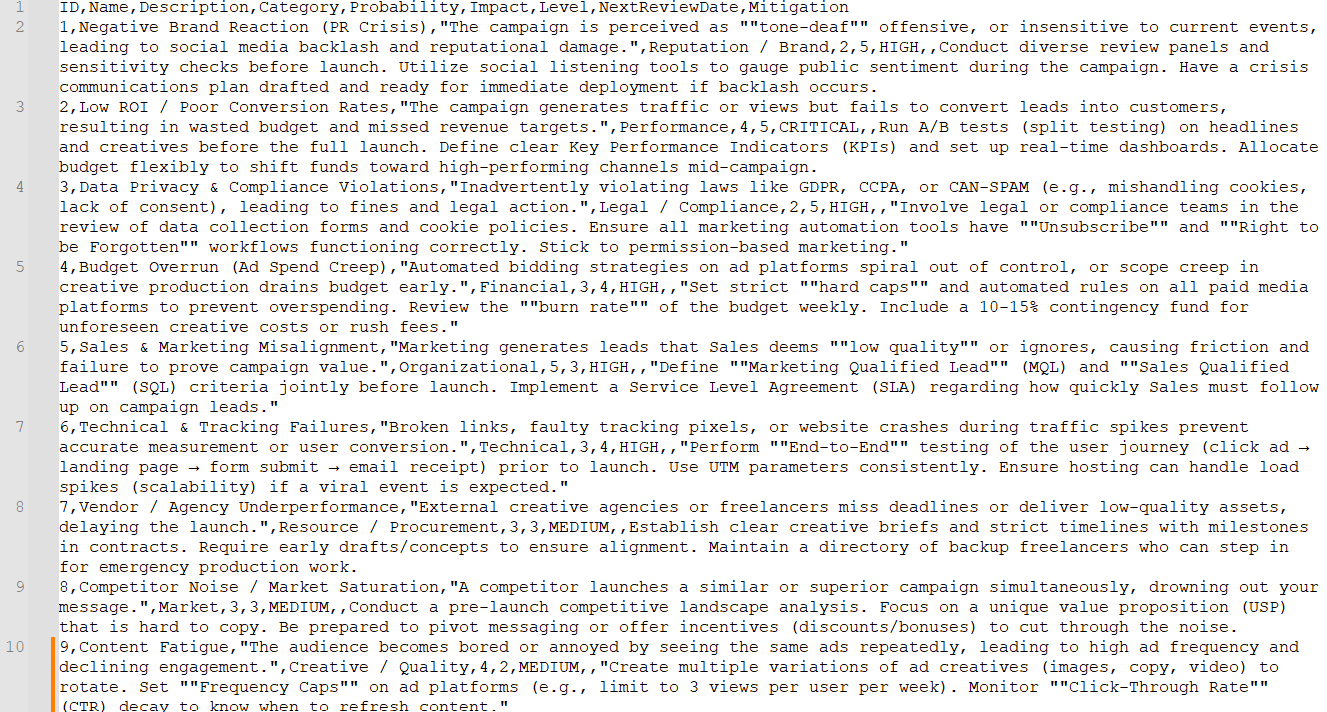
This is where most risk tooling stops and Pocket PMO keeps going. Risks in Pocket PMO are not rows in an isolated table — they connect to the project's issue flow. When a risk materializes or gets actively worked, linked issues show up against the risk row with a live open-issue count, so you can see at a glance which risks are actually in play rather than merely listed.
Each risk also carries its resolution history from Solver: whether it was closed with an action item, closed as informational only, combined into another issue, or killed as stale — with timestamps. Six months into a project, you can answer the question auditors and steering committees actually ask: "what did you do about this?" — with a record instead of a recollection.
And when a risk needs active work, one click opens it in Solver, the resolution workspace where the issue gets processed and the outcome flows back to the risk register.
Using the risk matrix to forecast
The matrix is qualitative, but it is the natural on-ramp to quantitative forecasting. A risk you have scored probability 4 and impact 4 on schedule is precisely the kind of uncertainty that Monte Carlo simulation and PERT analysis are built to quantify. The matrix tells you which uncertainties deserve the modeling effort; the models tell you what those uncertainties do to your finish date and confidence levels.
In practice the loop looks like this: score risks in the matrix, notice that the high-exposure cells are dominated by schedule threats, then carry that uncertainty into Pocket PMO's PERT and Monte Carlo tools to see the range of plausible completion dates instead of a single fragile target. The matrix becomes the intake instrument for the forecast, and the forecast becomes evidence for which mitigations actually buy back schedule risk.
The same logic runs in reverse. When a simulation shows an 80th-percentile finish date you cannot live with, the matrix tells you where the leverage is: the critical and high cells are where a mitigation changes the distribution, and everything below them is noise.
One project record, not another isolated file
The reason risk matrices go stale is disconnection, so Pocket PMO refuses to give risk its own silo. The risk matrix lives in the same project record as your earned value indexes, budget tracking, stakeholder plans, and status reporting. When CPI drops below 1.0 or the budget drifts, the risk review happens against the same live data that triggered the concern — no swivel-chair exports, no reconciliation meeting about whose spreadsheet is current. Risk management stops being a monthly document ritual and becomes part of how the project thinks.
Three risks worth scoring on every project
Not sure what belongs in the matrix at kickoff? These three show up on almost every project, and each scores differently — which is exactly the point of scoring them.
- Supplier or vendor delay — probability 4, impact 4, score 16: Critical. Your mitigation is an early-order plan or a second-source option, and the review date belongs before the delivery checkpoint, not after it.
- Scope creep — probability 4, impact 3, score 12: High. The mitigation is a change-control rule agreed now, while everyone is still friendly, plus a review at every scope conversation.
- Key-person dependency — probability 3, impact 5, score 15: High. One person holds knowledge nobody else has, and their loss stops delivery. Mitigation is documentation and deliberate pairing, reviewed monthly.
How often should you update a risk matrix?
Review the matrix at every status checkpoint, and re-score immediately after any material change to scope, resources, or assumptions. A matrix that is only refreshed before steering meetings tends to lag reality — which is exactly when escalation decisions are being made. Pocket PMO makes the cadence enforceable instead of aspirational: every risk carries a next review date, the summary cards show the current severity mix at a glance, and any drift between the scores and live project performance is visible in the same screen.
A connected workflow, not another isolated file
Pocket PMO keeps project management techniques close to the rest of the project record so decisions can be based on consistent data.
- Score risks consistently on a 5x5 probability and impact grid
- See critical, high, medium, and low counts at a glance
- Attach mitigation plans and review dates to every risk
- Follow each risk through issues and solver resolution history
How teams use it
- Step 1
Capture each risk with a name, category, probability, impact, and mitigation plan.
- Step 2
Pocket PMO scores the risk, places it on the matrix, and colors the cell by severity.
- Step 3
Filter the grid by level or category to run a focused risk review.
- Step 4
Set a next review date so no risk goes stale between checkpoints.
- Step 5
Open a risk in Solver to work the issue and record the resolution.
Frequently asked questions
What is a project risk matrix?
A project risk matrix plots risks by probability and impact so teams can prioritize mitigation and escalation. In Pocket PMO it is a 5x5 grid: each risk is scored 1-5 on probability and 1-5 on impact, and the product of the two places it in a critical, high, medium, or low cell.
What is the difference between a risk matrix and a risk register?
The matrix is the prioritization view — the grid that shows which risks matter most. The register is the record — names, descriptions, categories, scores, mitigation plans, and review dates for every risk. Pocket PMO keeps them as one dataset: the grid answers what matters most, the register answers what we are doing about it.
How is a risk score calculated?
Pocket PMO multiplies probability by impact, each scored 1 to 5. A score of 16 or more is critical, 10 to 15 is high, 6 to 9 is medium, and 5 or less is low. Fixed bands keep scoring consistent across reviewers and projects.
Can a risk matrix be used for small projects?
Yes. A simple probability-impact matrix helps small teams focus on the few risks most likely to affect delivery. Scoring five risks honestly beats maintaining fifty rows of theater.
How does a risk matrix improve forecasting?
The matrix identifies which uncertainties are large enough to model. Those high-exposure risks feed directly into schedule forecasting techniques like PERT and Monte Carlo simulation, which turn "this could slip" into a range of completion dates and a confidence level you can commit to.
How often should a risk matrix be updated?
At every status checkpoint, plus a re-score after any material change to scope, resources, or assumptions — the matrix is only as good as its freshest score.
Related planning pages
Project risk matrix template guide
Build a practical project risk matrix with probability, impact, owners, responses, and escalation triggers.
Work breakdown structure software for practical project planning
WBS software that turns project scope into a work breakdown structure connected to estimates, resources, and reporting in one planning workspace.
ROM estimation software for early project decisions
Build rough order of magnitude (ROM) estimates for early project budgets and refine them as scope becomes clearer. ROM stands for rough order of magnitude.
PERT analysis software for schedule estimates
Estimate project schedules with optimistic, most likely, and pessimistic durations using PERT analysis in Pocket PMO.
See it in Pocket PMO
Pocket PMO keeps project management techniques close to the rest of the project record so decisions can be based on consistent data.